Setting up iOS Connection
In order to do anything with HomeKit, you need an iOS device running iOS 8 or later and an app that supports HomeKit. To follow the steps here, you will need a membership in Apple's iOS Developer Program as well as a computer running OS X 10.9 or later with Xcode 6 or later installed.
-
Download Apple's HomeKit sample app from Here on the computer running OS X.
-
Open "HMCatalog.xcodeproj".
-
Change the app ID to your reverse domain notation from what it is (to com.yourcompany.HMCatalog)
-
Add an App ID and provisioning profile with the HomeKit entitlement to your account via the iOS Developer Portal.
-
Build and run the app on your device.
-
Allow the app access to your home data if it asks for it.
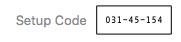
From within this app, you can pair your various HomeKit devices to your iOS device, as well as remove already paired devices. You can also control the devices you have paired. The default PIN for pairing a HomeKit device provided by HAP-NodeJS is 031-45-154 (the hyphens don't matter when entering on the device).